Two ways to see a screen: the accessibility tree and AI vision
AppClaw reads the structured accessibility tree when it exists (fast, exact, cheap) and falls back to vision on the raw pixels when it doesn't. Here's how the agent decides, and why the same tap works either way.
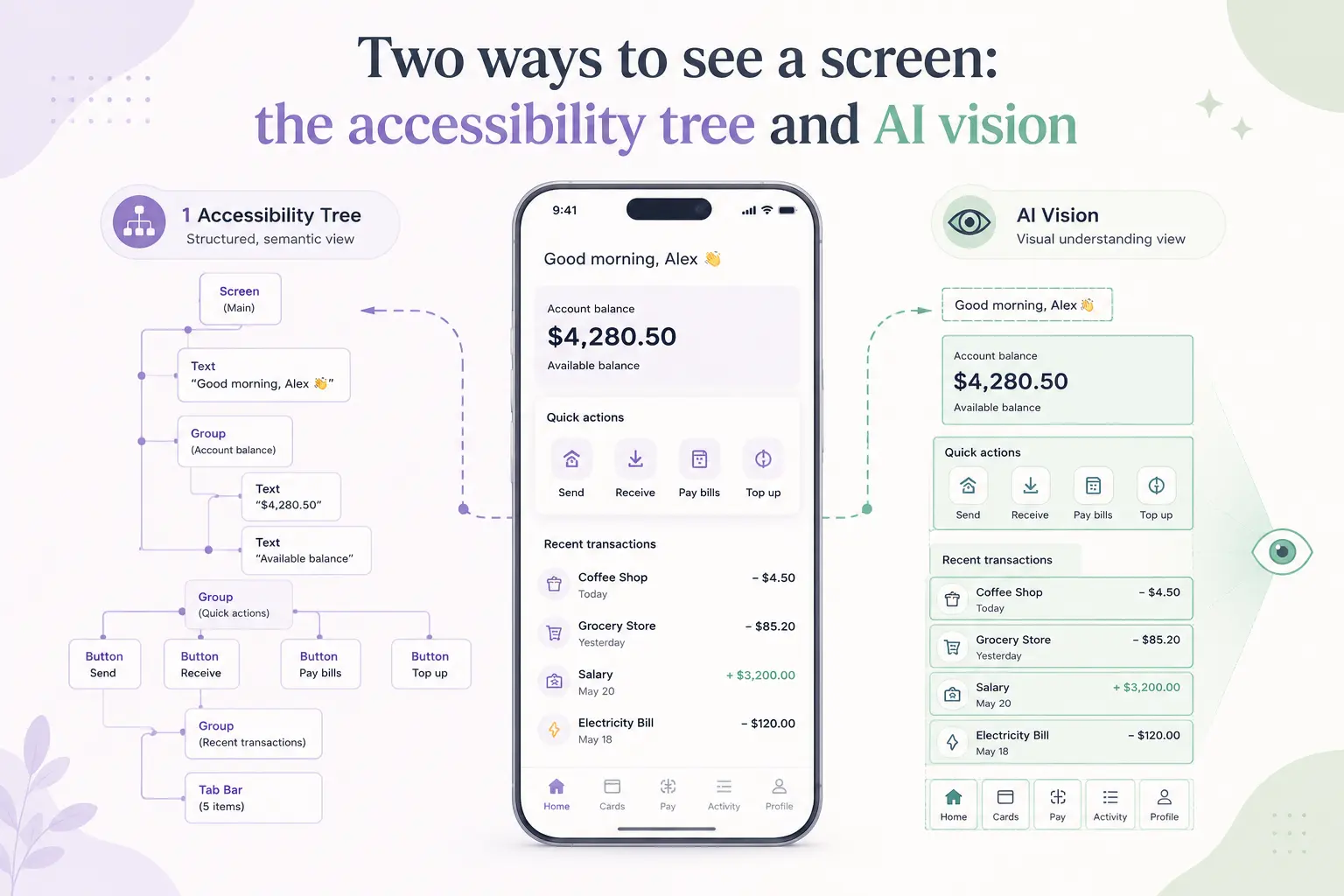
Perception is the first step of every loop AppClaw runs. Before it can reason about a goal or act on it, the agent has to answer a deceptively hard question: what is on the screen right now? There are two good answers, and AppClaw keeps both on hand.
The fast path: the accessibility tree
Most native screens expose a structured accessibility tree, the same data screen readers use. It’s a hierarchy of nodes with types, text, bounds, and state. When it’s there, it’s the best source we have: exact coordinates, real text, no inference required.
AppClaw reads that XML through Appium, then trims it hard before it ever reaches the model. Raw page source is enormous and mostly noise: layout containers, off-screen nodes, redundant attributes. The trimmer collapses that into a compact representation of the elements that can actually be acted on, which keeps token cost low and the model’s attention on what matters.
node  Button      "Login"     [412,1180][668,1264]
node  EditText    "Password"  [96,1020][972,1096]
node  TextView    "Log in"    [720,1360][864,1400]
Fast, exact, cheap. This is the path AppClaw prefers, and on well-built native apps it’s the path it stays on.
The fallback: vision on raw pixels
Then there are the screens where the tree lies or is simply empty. A Flutter app that renders everything to a single canvas. A game. A WebView with no semantics. A custom-drawn control that reports nothing useful. Ask the accessibility tree about these and it shrugs.
So AppClaw falls back to a screenshot and locates the element visually, returning normalized coordinates it can tap. The reasoning is different under the hood (the model is looking at pixels, not parsing a tree) but the interface above it is identical.
Why the tap is the same either way
This is the part that makes it usable. Your instruction,
tap the Login button below the password fieldnever mentions which perception mode is in play. The agent decides: tree if it’s trustworthy, vision if it isn’t. Both resolve to a coordinate, both feed the same act step, both get verified the same way afterward. You author once against intent, and the plumbing underneath adapts to whatever the app happens to expose.
Two ways to see, one way to point. That separation, a stable instruction layer over a swappable perception layer, is what lets AppClaw work on the messy long tail of real apps instead of just the well-behaved ones.